Keybinds#
“SUPER” can also be referred to as the “Windows” key.
| Keybind | Action |
|---|---|
SUPER + M | Exit Hyprland |
SUPER + SHIFT + L | Lock the screen |
SUPER + W | Switch wallpaper, picked randomly from the wallpapers/ directory |
SUPER + RETURN | Open terminal |
SUPER + B | Open web browser |
SUPER + R | Open application launcher |
SHIFT + PRINT | Capture the current output |
PRINT | Capture a selected region |
SUPER + Q | Close the active window |
SUPER + V | Toggle floating mode for the active window |
SUPER + F | Toggle fullscreen for the active window |
SUPER + SHIFT + F | Toggle maximized fullscreen for the active window |
SUPER + ← | Focus window to the left |
SUPER + → | Focus window to the right |
SUPER + ↑ | Focus window above |
SUPER + ↓ | Focus window below |
SUPER + H | Focus window to the left |
SUPER + L | Focus window to the right |
SUPER + K | Focus window above |
SUPER + J | Focus window below |
SUPER + 1–9, 0 | Switch to workspace 1–10 (0 = workspace 10) |
SUPER + SHIFT + 1–9, 0 | Move the active window to workspace 1–10 (0 = workspace 10) |
SUPER + Left Mouse Button | Drag/move the active window |
SUPER + Right Mouse Button | Resize the active window |
octoberctl#
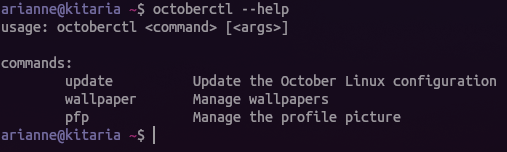
octoberctl is the command-line utility used to manage October Linux. It can, amongst other things:
- Update the configuration
- Manage wallpapers
- Manage the profile picture